インストール
Download RStudio Server for Debian & Ubuntu – RStudio
https://rstudio.com/products/rstudio/download-server/debian-ubuntu/
$ sudo apt-get install r-base
$ sudo apt-get install gdebi-core
$ wget https://download2.rstudio.org/server/bionic/amd64/rstudio-server-1.3.1073-amd64.deb
$ sudo gdebi rstudio-server-1.3.1073-amd64.deb
Accessing RStudio Server Open-Source – RStudio Support
https://support.rstudio.com/hc/en-us/articles/200552306-Getting-Started
8787ポートに接続し、Linuxホストのユーザで認証を行うことでRstudioに接続できる。
cat <(echo "date,max,q,i") <(cat yok-1960.csv | tail -n +7 | head -n -1) <(cat yok-1990.csv | tail -n +7 | head -n -1) > yok.csvR-Source
http://cse.naro.affrc.go.jp/takezawa/r-tips/r/40.html
Quick-R: Date Values
https://www.statmethods.net/input/dates.html
R – Rstudioでdplyrがインストールできません|teratail
https://teratail.com/questions/209663
$ install.package(“dplyr”)
Group data by month in R
https://ro-che.info/articles/2017-02-22-group_by_month_r
> tyo %>% group_by(month=floor_date(d, "month")) %>% summarize(amount=sum(max))
`summarise()` ungrouping output (override with `.groups` argument)
# A tibble: 720 x 2
   month      amount
   <date>      <dbl>
 1 1960-01-01   328.
 2 1960-02-01   367.
 3 1960-03-01   454
 4 1960-04-01   516.
 5 1960-05-01   691.
 6 1960-06-01   759
 7 1960-07-01   925.
 8 1960-08-01   944.
 9 1960-09-01   834.
10 1960-10-01   653.
Countifs in R Studio – General – RStudio Community
https://community.rstudio.com/t/countifs-in-r-studio/47418/2
filter()
dplyrを使いこなす!Window関数編 – Qiita
https://qiita.com/matsuou1/items/db6e8c48fcfd791dd876#%E3%83%AD%E3%83%BC%E3%83%AA%E3%83%B3%E3%82%B0%E9%96%A2%E6%95%B0
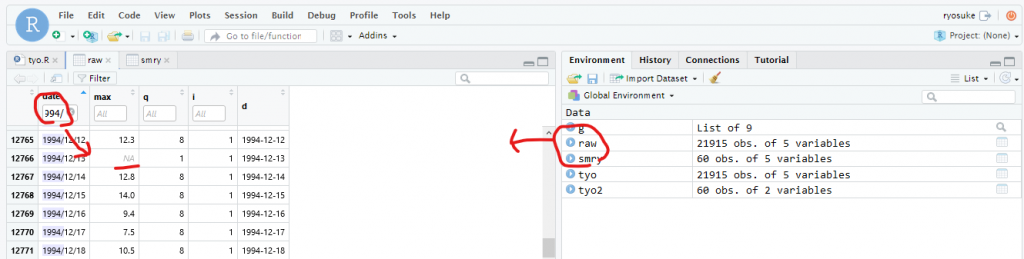
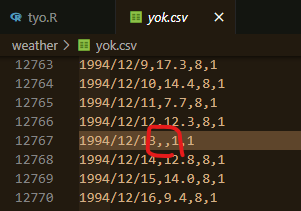
データ欠損
Leave a Reply